Getting Started
Most Kubernetes engineers type this command every single day. But behind that one line sits an entire orchestration engine quietly working to bring your application to life.
Here is the full internal workflow, broken down step by step.
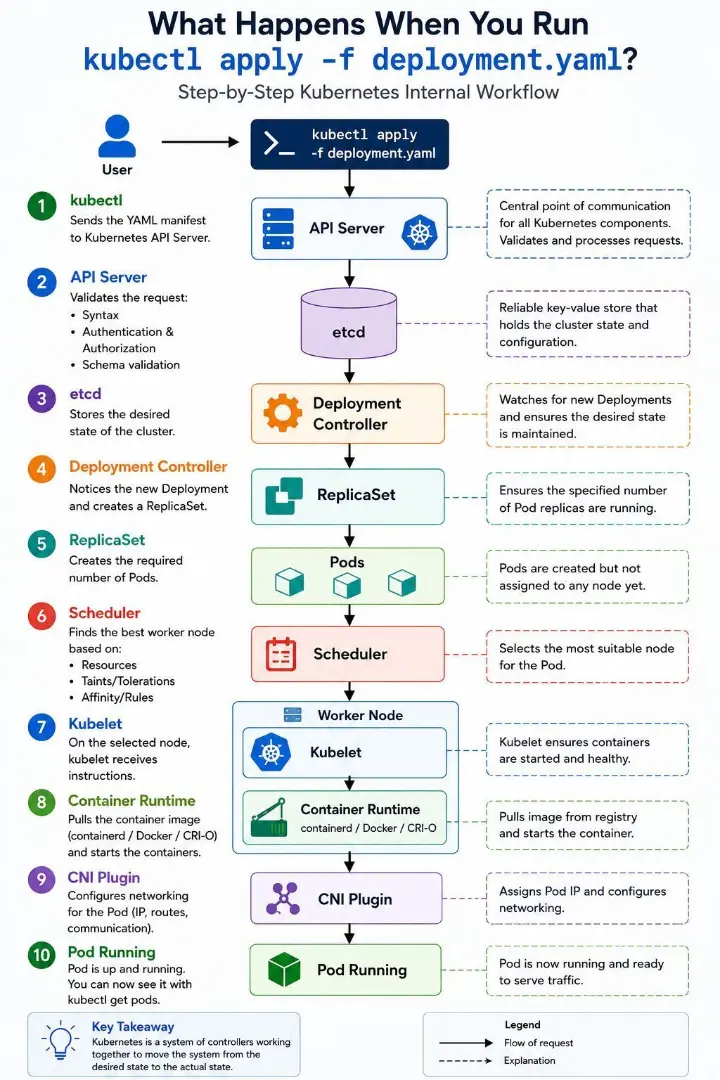
The Journey in 10 Steps
What actually happens after you hit enter on kubectl apply -f deployment.yaml
1. kubectl Sends the YAML manifest to the Kubernetes API Server, which acts as the central point of communication for every request that enters the cluster.
2. API Server Validates the request by checking syntax, authentication and authorization, and schema validation before accepting it.
3. etcd Stores the desired state of the cluster. etcd is a reliable key value store that holds the cluster state and configuration, serving as the single source of truth.
4. Deployment Controller Notices the new deployment and creates a ReplicaSet, then keeps watching to make sure the desired state is maintained.
5. ReplicaSet Creates the required number of pods. At this point the pods exist, but they have not yet been assigned to a node.
6. Scheduler Finds the best worker node for each pod based on available resources, taints and tolerations, and affinity rules.
7. Kubelet On the selected node, kubelet receives the instructions and makes sure the containers are started and stay healthy.
8. Container Runtime Pulls the container image, using containerd, Docker, or CRI O, and starts the containers.
9. CNI Plugin Configures networking for the pod by assigning its IP address and setting up the routes it needs to communicate.
10. Pod Running The pod is up and running and ready to serve traffic. You can confirm it with kubectl get pods.
Kubernetes Is a Desired State System
You do not tell Kubernetes how to run your application. You tell it what you want, and a system of controllers works continuously to move the cluster from its current state to that desired state.
This is why Kubernetes can:
- Heal itself automatically when pods fail
- Scale workloads up or down as needed
- Recover gracefully from node failures
- Maintain application availability without manual intervention
Key Takeaway
Kubernetes is a system of controllers working together to move the system from the desired state to the actual state.
Final Thought
Next time you run kubectl apply, remember that you are not just deploying a file. You are triggering an entire chain of the API Server, etcd, controllers, the scheduler, kubelet, the container runtime, and the CNI plugin, all working together behind the scenes to turn a YAML file into a running application.
Behind the Scenes of kubectl apply: How Kubernetes Turns Intent Into Reality